Choosing a CRM is less about finding the longest feature list and more about matching a system to the way your team works. Customer details and conversations can become scattered across spreadsheets, email and staff notes, making it harder to keep relationships organised. If you are comparing crm software for small business dubai, start by identifying what your team needs to manage and where information currently gets lost.
A CRM provides a structured way to organise customer information and related interactions. To choose one well, distinguish the tasks your business needs to manage from optional capabilities that could add complexity. This guide covers how to assess a CRM, prepare your team and compare options. It also introduces ITSthe1 Solutions’ 1.CRM, a CRM for SMEs, without assuming features beyond its stated scope.
Key Takeaways
- Map how customer information moves through your business to spot gaps in follow-up, ownership and handovers.
- When assessing crm software for small business dubai, prioritise the tasks your team needs to manage every day.
- Identify the people who will use the system, the person making the decision and the outcomes you want before comparing options.
- Consider ITSthe1’s 1.CRM as an SME-focused solution and assess it against your documented processes.
What CRM Software Does for a Small Business
When customer details sit in separate spreadsheets, inboxes and staff notes, it can take extra effort to understand the history of a conversation or decide who should follow up. Customer relationship management software gives a business a more organised way to manage customer records and related interactions. For a broader introduction to the concept, see Customer Relationship Management (CRM).
CRM software for a small business helps organise customer information and interactions so a team can manage relationships with greater continuity. A shared record can give colleagues context about previous conversations, outstanding actions and responsibility for the next step. This is especially useful when an enquiry passes between team members or someone needs to take over a customer conversation.
Which customer-management tasks can a CRM organise?
A business may use a CRM to organise contact records, log enquiries, note follow-ups and track sales opportunities. These are examples of customer-management tasks, not a feature checklist that applies to every product. Systems differ in their functions and how they organise information, so assess what a particular option actually includes rather than assuming all CRMs work the same way.
The right scope depends on your processes, not just the size of your team. A small team receiving enquiries through several channels may need a clear way to record conversations and assign follow-ups. A team with defined sales stages may also need to keep track of where each opportunity stands. Before comparing crm software for small business dubai, write down where customer information is created, who needs to use it and where handovers currently break down. These details help you decide what the CRM should support.
How to Evaluate CRM Software for a Small Business
A longer feature list does not automatically make a CRM a better fit. Capabilities are useful when they support real tasks and responsibilities. For businesses searching for crm software for small business dubai, begin with your current processes, then assess whether each option can support them without adding unnecessary steps.
What should a small business assess before choosing a CRM?
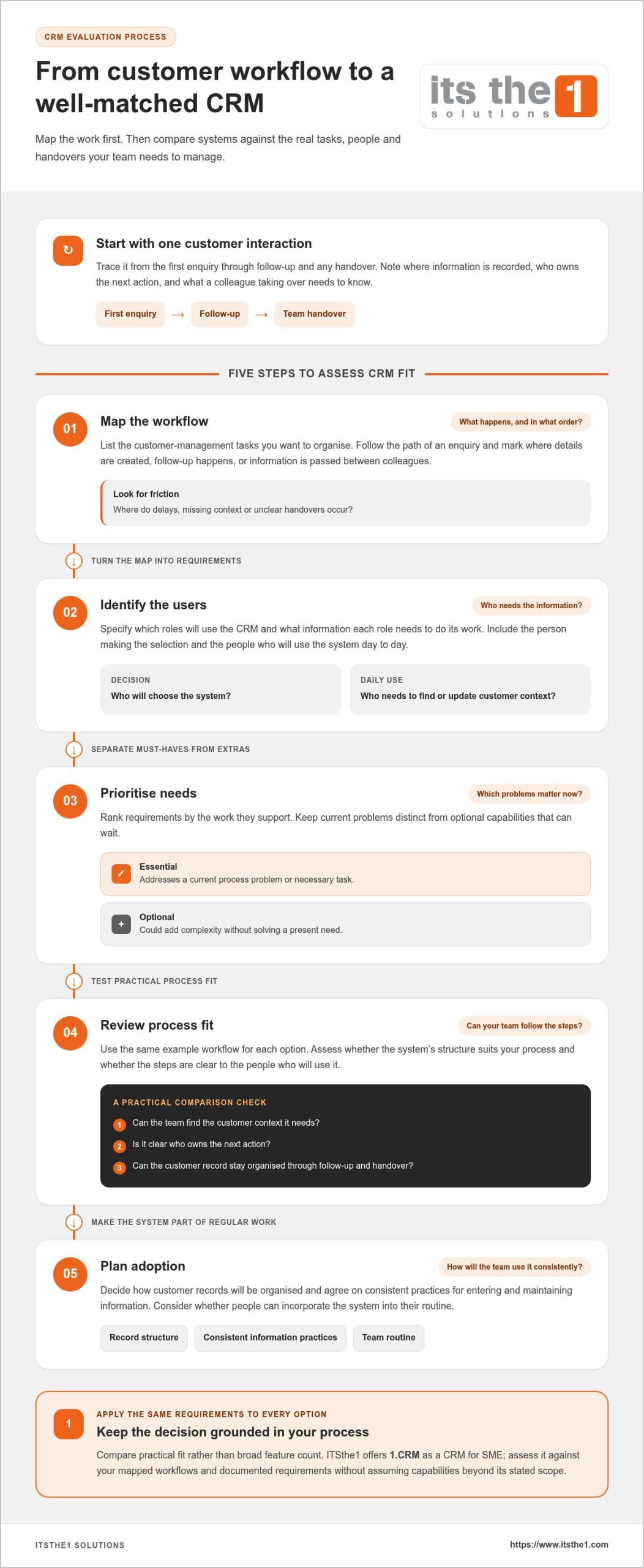
Trace a customer interaction from the first enquiry through follow-up and any handover between colleagues. Note where the information is recorded, who is responsible for the next action and what someone taking over would need to know. For example, if an enquiry is recorded in a spreadsheet but follow-up happens by email, identify what information the next person would need to see in one place. This gives you a practical scenario to use when assessing usability and process fit.
Map the work, identify users, rank essential needs, compare process fit and plan how the team will adopt the system.
- Map workflows: List the customer-management tasks you want to organise and the order in which they happen.
- Identify users: Specify which roles will use the CRM and what information each role needs to do its work.
- Prioritise needs: Separate requirements that address current problems from optional capabilities that can wait.
- Review fit: Consider whether the system’s structure suits your process and whether the steps are clear to the people who will use it.
- Plan adoption: Decide how customer records will be organised and how the team will make CRM use part of its regular work.
Use the same example workflow to compare options. Can the team find the customer context it needs, understand who owns the next action and keep the record organised? Compare systems against those practical questions rather than relying on a broad feature count. ITSthe1 offers 1.CRM as a CRM for SME. Explore ITSthe1’s SME CRM offering as part of your evaluation.
From CRM Evaluation to a Practical Next Step
Prepare before you compare platforms. Document how your business manages customer relationships, from the first enquiry to follow-up. Include the roles involved, where information is recorded and where delays or unclear handovers occur. A simple process map gives the people involved in the decision a shared view of what the CRM needs to support.
How can a small business prepare for CRM adoption?
Turn the process map into a prioritised requirements list. Describe essential needs in terms of the work to be done, such as making follow-up responsibility clear or helping colleagues find relevant customer context. Then identify who will make the selection and who will use the system day to day. Separating essential requirements from useful additions helps keep the decision focused.
Compare each option against the same requirements and workflow. Consider whether its approach fits the way your team works and whether people can incorporate it into their routine. Check how customer records will be structured and agree on consistent practices for entering and maintaining information. A CRM should support the processes you want to organise, not lead you to add steps simply because a system offers them.
With your priorities documented, you can assess an SME-focused solution in context. ITSthe1 offers 1.CRM as a CRM for SME. Evaluate it against your mapped processes and requirements, without assuming capabilities beyond its stated scope.
Review ITSthe1’s software solutions alongside your requirements to consider how an SME-focused CRM could fit the workflows you want to organise.
Make Your CRM Decision with Clear Priorities
A sound CRM decision starts with your business, not a feature comparison. Map how customer information moves through your team, identify the intended users and prioritise the tasks you want to organise. This provides a practical basis for assessing crm software for small business dubai and avoiding complexity that does not address your needs.
ITSthe1 offers 1.CRM, a CRM for SME. Compare it with your documented requirements and the workflows you want the system to support.
Explore ITSthe1’s SME CRM solution and assess 1.CRM against your team’s priorities.
Frequently Asked Questions
What is CRM software for a small business?
CRM software for a small business is a system for organising customer information and related interactions. It can give a team a consistent place to review customer context and coordinate responsibilities. Capabilities vary by product, so distinguish the core purpose from optional functions. The right scope depends on the workflows the business wants to organise and who needs to use the system.
Does a small business need CRM software?
Not every small business needs a dedicated CRM immediately. It may be worth considering when customer details are difficult to find, follow-ups are inconsistent or several team members need shared context. First identify which of these problems affects your work and what a CRM should improve. If current processes remain clear and manageable, define the need before introducing another system.
How do I choose CRM software for a small business?
Compare systems against your actual workflows rather than counting features. For crm software for small business dubai, map how customer information moves through your team, identify the intended users and rank essential requirements. Then assess how each option fits those processes and how straightforward it will be for the team to use. A focused shortlist keeps the decision practical and aligned with business priorities.
What should a small business check before adopting a CRM?
Document the customer-management steps, the roles responsible and the improvements you want before adopting a CRM. Decide who will select the system and who will use it day to day. Prepare a prioritised requirements list, then plan how records will be organised and how the CRM will fit into team routines. This preparation highlights process gaps and gives you a consistent basis for comparing options.