A video wall is more than a group of displays. Operators need to coordinate what appears on each screen and where each source is placed. Video wall management software brings these tasks together in a central interface, helping teams arrange content and manage display workflows. The right software can also work alongside AVoIP, which transports audio and video over a network, and KVM, which gives operators access to computers and control devices.
For enterprise teams, the main benefit is making complex display environments easier to operate without treating each component as a separate system. This guide explains how the software works with operator workstations, AVoIP, and KVM, and what to assess when planning a control-room or enterprise deployment. It also covers how system design and operational needs shape a solution that can adapt as requirements change.
Key Takeaways
- Match the control method to the task: remote controls handle basic display functions, while touchscreens support real-time content control.
- Plan how workstation access, networked audio-video transport, and keyboard-video-mouse control will coordinate in your operating environment.
- Assess practical requirements such as per-wall user permissions, controller redundancy, and room to expand as operations grow.
- For enterprise or hospitality environments that need IPTV, explore how 1.TV can fit into the wider technology setup.
What is Video Wall Management Software?
The system gives operators a central interface for arranging and controlling displays, sources, and layouts. A video wall management software interface should clearly identify which screen or wall an operator is changing.
Control Methods and Access
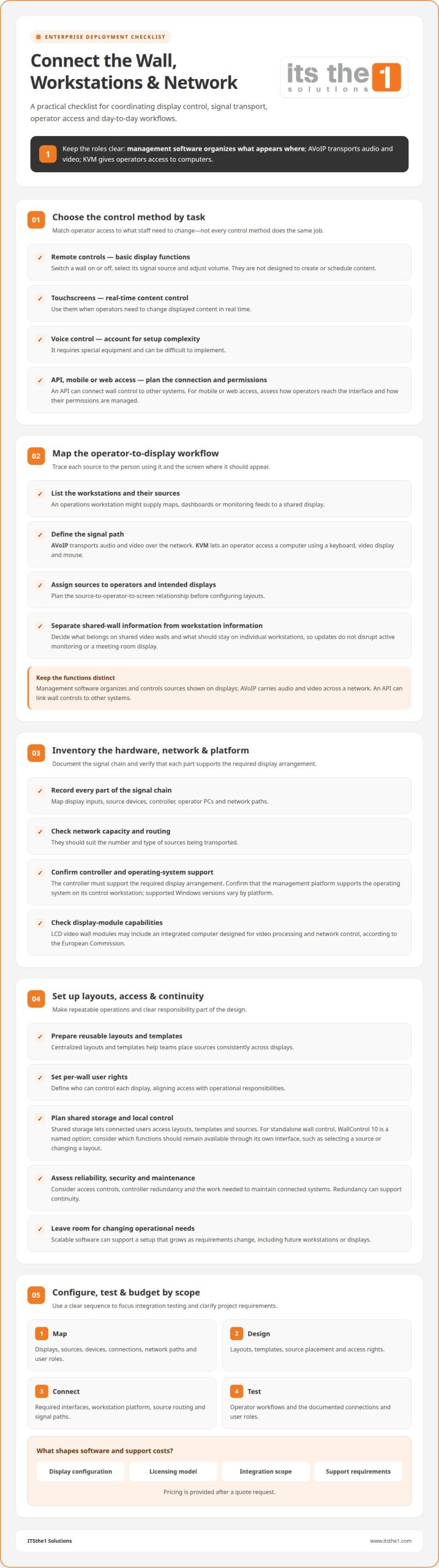
Remote controls can switch a wall on or off, select its signal source, and adjust volume, but they are not designed to create or schedule content. Touchscreens let operators change displayed content in real time, while voice control requires special equipment and can be difficult to implement. An API can connect wall control to other systems. For mobile or web access, assess how operators will reach the interface and how permissions will be managed.
Standalone Wall Control
WallControl 10 is a named option for standalone wall control. In this setup, operators manage the video wall through its own control interface rather than relying on a wider integration to perform basic display tasks. Consider which functions need to remain available locally, such as selecting a source or changing a layout. This helps clarify how a video wall management software deployment can support standalone workflows alongside workstation and network connections.
Control Room and Operations Benefits
Centralized layouts and templates help teams place sources consistently across displays. Shared storage lets connected users access layouts, templates, and sources, while per-wall user rights define who can control each display. Controller redundancy can support continuity, and scalable software lets the setup grow as operational needs change. These capabilities are particularly useful in control rooms that coordinate multiple information sources.
Software and support costs depend on the display configuration, licensing model, integration scope, and support requirements; pricing is provided after a quote request. To configure the system, map displays and sources, set layouts and user rights, connect the required interfaces, and test operator workflows. Assess security, reliability, and maintenance needs through access controls, controller redundancy, and the work needed to maintain connected systems. In the UAE, buyers can explore video wall software and integration services from technology vendors and system integrators, choosing an option based on operational requirements.
Integration with operator workstations, AVoIP, and KVM systems
Integration connects display control with the computers and signal pathways operators use. Plan around the workstation platform, source routing, and the tasks staff need to perform.
Operations Center Video Walls
In an operations centre, a workstation might supply maps, dashboards, or monitoring feeds to a shared display. AVoIP transports audio and video over the network, while KVM lets an operator access a computer using a keyboard, video display, and mouse. An API can link wall control to other systems, supporting a coordinated workflow instead of separate manual actions. Map each source to its operator and intended display before configuring layouts.
For operational signage distribution, define which information belongs on shared video walls and which should stay on individual workstations. This helps teams distribute updates without disrupting active monitoring or a meeting-room display.
Hardware and Network Requirements
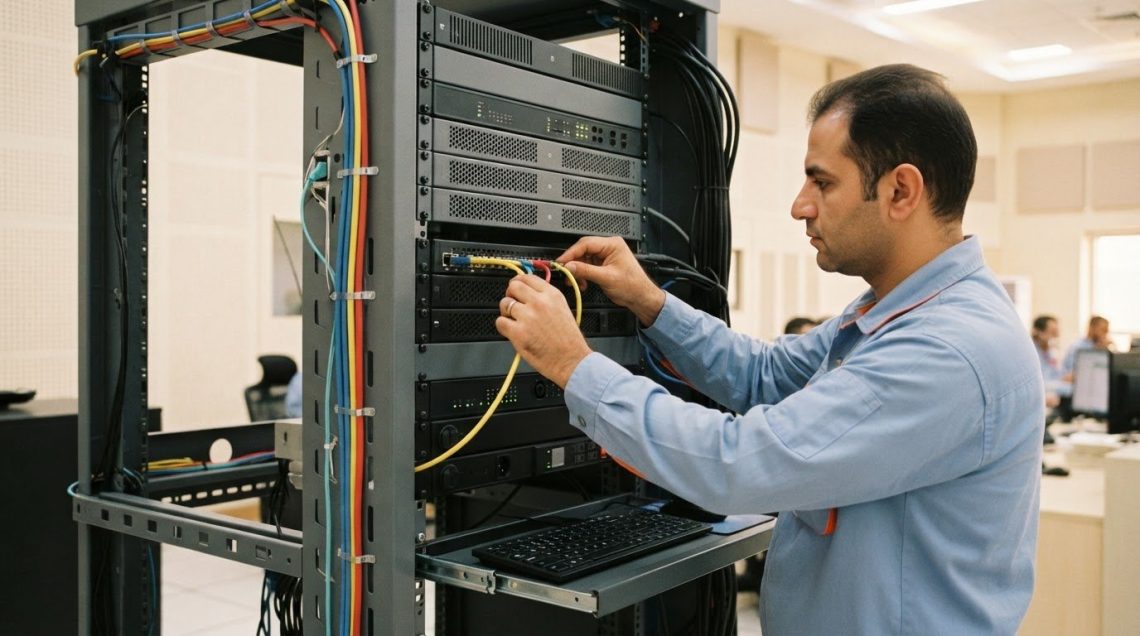
Start by mapping the display inputs, source devices, controller, operator PCs, and network paths in the signal chain. LCD video wall modules may include an integrated computer designed for video processing and network control, according to the European Commission. Network capacity and routing should suit the number and type of sources being transported, and the controller must support the required display arrangement.
Windows compatibility also matters: confirm that the management platform supports the operating system on its control workstation. A Windows-based interface can simplify operator access, but supported Windows versions vary by software platform. Documenting devices, connections, and user roles makes integration testing more focused.
For enterprise deployments that combine display control with wider technology planning, enterprise technology solutions can be a useful next step.
Video wall management software definition
Video wall management software is the control layer that organizes how sources appear across connected displays. It provides an interface for arranging content, saving layouts, and assigning access rights. It is distinct from both the display panels and the content itself. In practice, a screen shows an image, while the software coordinates its placement and operator control. This distinction helps teams define what the platform needs to manage.
Core capabilities can include viewing multiple walls in one interface, creating content-placement templates, and centrally storing layouts, templates, and sources for connected users. For example, an operations team could prepare a view with a live feed beside a dashboard and make it available to authorized users. Video wall management software can also set user rights for each wall, aligning access with operational responsibilities.
Management and signal transport are separate functions. AVoIP carries audio and video across a network; management software organizes and controls the sources shown on displays. An API can connect wall controls to other systems, while redundancy and expansion options support operational planning. These functions can work together, but each serves a different part of the deployment.
To define requirements, map the sources, decide which screens should display them, prepare a reusable layout, and assign access. Then assess whether the interface suits operators and can accommodate future workstations or displays. In a control room, video wall management software should fit established workflows as well as the display plan. Discussing these needs with a technology team can help shape a workable deployment.
For a clearer definition of project requirements, discuss your enterprise technology requirements with a technology team.
ITSthe1 Solutions: 1.TV – IPTV for Enterprise & Hospitality
ITSthe1 Solutions is a natural next step when an enterprise or hospitality team needs IPTV alongside its wider display environment. 1.TV – IPTV for Enterprise & Hospitality supports IPTV needs, while 1.DSMM – Digital Signage & Meeting Room addresses digital signage and meeting-room requirements. These offerings can help organizations plan distinct display functions within a broader technology setup.
Consider this route when guest-facing television or meeting-room communication is part of the project, rather than treating every display as an operations-center screen. For hospitality environments, 1.Hotel supports guest and staff app needs, while 1.ID addresses passport and ID scanning. Selecting the relevant service begins with defining the audience and purpose of each system.
Contact ITSthe1 Solutions to discuss how these offerings fit your enterprise or hospitality requirements.
Plan the Next Stage of Your Display Environment
Before expanding a display environment, define what operators need to see, who controls each workflow, and how the system should adapt as requirements change. A clear operating plan helps teams determine whether video wall management software supports day-to-day processes instead of adding complexity without a defined purpose.
Use that plan to align technical decisions with business priorities. Document the intended users, source pathways, access needs, and anticipated changes, then let those requirements guide the next project conversation. This gives stakeholders a shared basis for evaluating the design and its fit with wider enterprise or hospitality operations.
For a considered discussion of your technology requirements, contact ITSthe1 Solutions. A practical next step can help you move from an operational need to a clearly scoped project, with a direction your team can build on confidently.
Frequently Asked Questions
Where is it applicable?
Video walls are useful wherever teams need a shared visual workspace for multiple information sources. Examples include transport coordination rooms, utility monitoring centres, corporate security operations, university campuses, and hotel control areas. Ask whether staff regularly compare information from separate systems or need to communicate a shared operational picture. If they do, a coordinated display environment may support their workflow.
What is video wall management software and how does it work?
Video wall management software coordinates what appears across connected displays and gives operators a way to manage them. For example, a control-room operator could arrange a map, status dashboard, and camera feed in one working view. The software works with the display and source setup: it organizes and controls content rather than creating the underlying information.
What features should video wall management software include?
Prioritize features based on operator roles and actual workflows. A team that changes views during incidents may value quick layout switching and clear access controls; teams sharing wall configurations may need centrally managed sources. Also assess integration options, recovery planning, and the process for adding displays. Test these tasks with representative operator accounts before finalizing requirements.
What are the best video wall management software options in 2026?
The best option in 2026 is the one that fits the intended workflow and existing display environment. Compare platforms by testing a representative task, such as changing a source, saving a layout, or coordinating a wall with an operator workstation. Review the supported integrations, administration approach, and expansion path. Avoid ranking software on feature count alone.
How do video wall management platforms compare by features and supported hardware?
Compare each platform with the specific devices in your planned signal path: displays, video wall controller, source computers, operator workstations, and AVoIP or KVM components. Review the manufacturer’s compatibility documentation and test the required connections together. Then compare API access, user administration, layout handling, and redundancy, noting which workflows each platform supports directly.